Building your first production AI agent: Google ADK, RAG and MCP — and when a person must sign off
Google ADK conducts, RAG remembers, MCP acts — and a person signs off on anything that cannot be undone. Our notes from Dr Yu Yong Poh’s free AITraining2U webinar, with a live agent that settles a sales commission dispute.
- Talk
- Building Your First Production AI Agent (Google ADK, RAG, MCP)
- Speaker
- Dr Yu Yong Poh — Deputy Director of CBIEV at TAR UMT, former head of the data science laboratory at a public listed bank
- Host
- Warren, founder of AITraining2U
- When
- Thursday 29 October 2026, 9 pm Malaysia time. Billed as 90 minutes; it ran about 1 hour 45 minutes
- Where
- Online, one of AITraining2U’s free Thursday webinars
- Material
- 39 slides, a “practical field guide” in the speaker’s AI Forward Deployed Engineer series, and a live demo in a Python notebook
Building Your First Production AI Agent was a free Thursday-night webinar by AITraining2U on 29 October 2026, given by Dr Yu Yong Poh and hosted by the company’s founder, Warren. It was the speaker’s second session in the series this month. The first, on 8 October, was about the job of a forward deployed engineer — the engineer who works inside a client’s company and connects AI to its real systems. This one showed how to build the agent itself, with three tools that keep coming up together: Google’s Agent Development Kit (ADK), retrieval-augmented generation (RAG) and the Model Context Protocol (MCP).
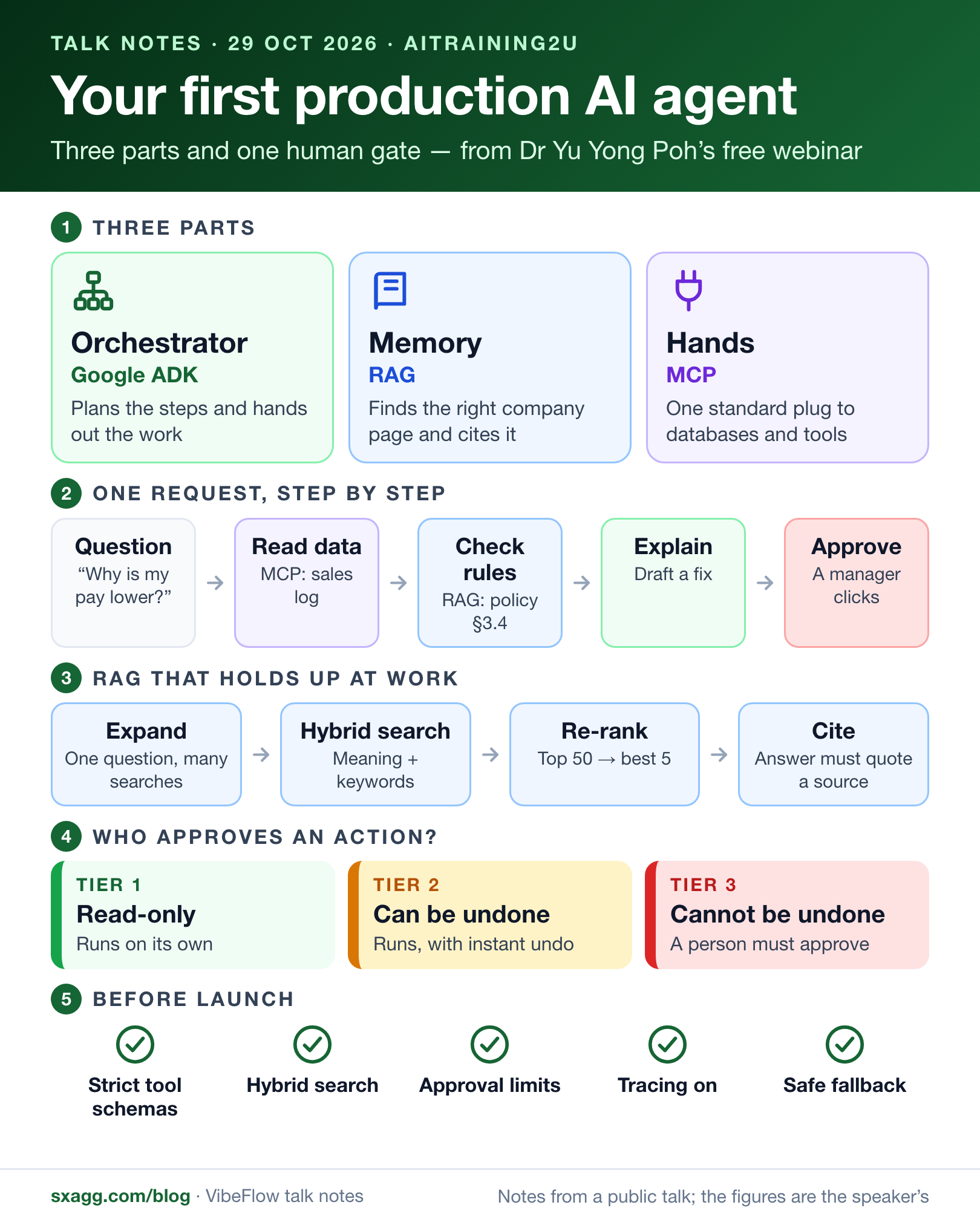
The infographic puts the whole talk on one page. The sections after it go through each part with the speaker’s own examples.
Terms used in this part
- AI agent
- An AI system that does not only answer, but plans steps, calls tools and changes data to finish a task.
- Orchestrator
- The part that manages an agent’s work: it splits a task into steps and gives each step to the right specialist agent.
- Google ADK
- Google’s Agent Development Kit, an open-source framework for building, testing and running agents in code.
- RAG
- Retrieval-augmented generation: find the relevant passages in your own documents first, then let the model answer from them.
- MCP
- The Model Context Protocol, an open standard created by Anthropic that gives AI models one common way to find and use outside tools and data.
- Vector database
- A database that stores text as lists of numbers, so it can find passages by meaning rather than by exact words. ChromaDB is a common one.
- Human in the loop
- A design in which a person must approve certain actions before the agent may carry them out.
Who is Dr Yu Yong Poh?
Dr Yu Yong Poh is Deputy Director of CBIEV at Tunku Abdul Rahman University of Management and Technology (TAR UMT), where the work is linking the university with industry and turning research into commercial projects. By the slides’ account, the speaker previously headed the data science laboratory at a public listed bank, put more than 100 machine learning models into live banking systems, designed a large all-in-one recommender system and managed prediction models behind more than RM1 billion in revenue.
The talk was meant to be practical rather than academic. Industry, the speaker said, cares less about theory than about whether a solution solves the client’s problem.
The 90-minute plan
The speaker opened with a show of hands. Quite a few people had heard of Google ADK, and slightly more of RAG. The harder question came next: had anyone deployed more than 100 agents in a single system?
Start with the problem, not the model
On the slides, the job of a forward deployed engineer is “production wiring”, not model training: connecting frontier models to real databases, APIs and business rules, removing surprises with fixed boundaries, and measuring value in production rather than on benchmarks. The engineer, the speaker said, is close to a consultant who stays with the client and follows the client’s pace, needs and pain points — not the other way round.
“My philosophy is that if you can use the simple solution, I always use that simple solution.”
If an equation is enough, there is no need for deep learning; if a script is enough, there is no need for an agent. So the first question to a client is which part of the work is repetitive, because that is what automation is for.
The running example came from a common kind of request: sales staff disputing their monthly commission. When such complaints were traced, the speaker said, the root cause was often not a wrong calculation but timing. The rate was right, but the system did not yet show it because of a time stamp. Only once the pain point and its cause are clear does it make sense to design agents for it.
Why does an AI agent need special plumbing?
The slides picture a large language model as a very clever child in a room with no windows. The child learned language, logic and a great many facts before the door closed, but cannot see today’s weather, a live sensor value or the company’s private folders. Ask for a customer’s file and the child can only guess.
Pasting everything into the prompt is not the answer. Even the largest models read only about one to two million tokens at once, in the speaker’s words, and an AI given too much at once starts to forget — like a person asked to read a thousand books in one minute. The child needs two things passed under the door: the right pages, and a way to reach the outside world. Those are RAG and MCP.
The orchestrator — Google ADK
Manages the conversation, plans the steps, hands each sub-task to a specialist agent and checks the result.
The memory — enterprise RAG
Finds the few pages of company documents that answer this question, so the model reads facts instead of guessing.
The hands — MCP
One standard connector from the agent to databases, ERP and payroll systems, so no tool needs its own glue code.
What is RAG? The library and the librarian
RAG (retrieval-augmented generation) lets an AI model answer from your own documents. It searches them first, then hands the most relevant passages to the model together with the question, so the answer rests on facts the model was never trained on — and can cite them.
In the speaker’s picture, it works like a library with a good librarian. The library holds millions of company documents that the AI never memorises. When a question arrives, the librarian uses the catalogue to find the few pages that matter and slides them under the door, and the child answers from those fresh pages.


Under the hood, the documents are cut into chunks and each chunk is turned into a vector — a list of numbers that captures its meaning. The question becomes a vector too, at the moment it is asked. Vectors that point the same way are similar: the angle between them is close to zero and its cosine close to one, which the speaker tied back to school mathematics. The most similar chunks go to the model, which writes the answer. A common free vector database for this is ChromaDB.
What is MCP? One plug for every tool
MCP (the Model Context Protocol) is an open standard, released by Anthropic in November 2024, that gives AI models one common way to find and use outside tools and data — databases, files and business systems. An agent that speaks MCP can use any tool that offers an MCP server, without custom code for each.
Databases, cloud drives and factory machines all speak their own protocols; the slides call it the Tower of Babel problem. The Model Context Protocol gives every tool the same connector, the way USB-C gives every device one plug. It was created by Anthropic and is now used across the industry, so an agent can talk to PostgreSQL, Slack or a factory machine without custom glue code for each one.

.jpg)
RAG vs MCP: what is the difference?
RAG and MCP do different jobs and are usually used together. RAG is a knowledge system: it finds the right passage in your documents. MCP is an action system: it connects the agent to software that can look things up or change them. Both, the speaker said, are about efficiency and cost: RAG avoids stuffing everything into the prompt, and MCP avoids writing and maintaining a different connector for every tool.
RAG — the librarian
A knowledge system
- Finds the right page so that the AI can read it
- Solves stale knowledge: the model never saw your private documents
- Works by chunks, vectors and a similarity search
- Answers with a source you can check
MCP — the universal plug
An action system
- Connects the AI to outside software safely
- Solves the connector problem: one standard for every tool
- Works as a host, a client and servers, over JSON-RPC
- Can read data or stage an action, not only talk
Asked in the chat how MCP differs from an ordinary API, the speaker explained that an API can be one of the tools behind an MCP server. MCP is the standard way for the agent to find that tool and call it.
When should you use MCP — and when not?
The first Thinking Corner asked exactly this. Most of the time, the speaker added, a simple self-contained script does not need MCP at all.
Use MCP when…
- Many teams share many tools across the company
- The same tool servers must work with several AI clients — Gemini, Claude, code editors
- Tools must be added or swapped without redeploying the agent
Skip MCP when…
- One simple, self-contained Python function does the job
- A loop needs sub-millisecond speed
- You cannot limit each tool to the smallest permissions it needs
What is Google ADK? The conductor
Google ADK (Agent Development Kit) is Google’s open-source framework for building, testing and deploying AI agents in code. In a production agent it is the orchestrator: it keeps the conversation state, calls the model, runs the steps and hands each one to the right tool or specialist agent.
The speaker was careful to say that using Google ADK in the talk is not a claim that it is the best kit: it is common in Malaysia and easy to start with. Paid, no-code alternatives include Microsoft Copilot Studio and Gemini Enterprise, and China has its own equivalents.
Agent runtime
Keeps the prompt state, calls the model and runs the loop of steps.
Artifact storage
Keeps the files, images and data sets that the agents need or create, outside the prompt.
Tool hub
One place to register the functions, APIs and MCP servers that the agents may use.
An agent system needs a manager, just as a team of people does. In ADK that is the orchestrator: a supervisor agent that receives the request, splits it into steps and gives each step to a narrow specialist — one worker that searches the policy library, another that reads ledger or sensor data. Each worker sees only the inputs for its own sub-task, which keeps the prompts short and the costs down, and a validator agent checks the others’ work.


The slides offer two ways to organise the agents, and recommend the first for banking and other regulated work.
Hierarchical supervisor
Predictable — recommended for banking and regulated work
- A parent agent acts as the conductor
- It gives each narrow task to a specialist agent
- Workers see only the inputs for their own task, so prompts stay short
- Easier to test, audit and replay
Peer swarm
Collaborative — suited to open exploration and research
- Agents hand the work to one another
- Cues in the task decide which agent goes next
- More room for brainstorming
- Harder to predict and to debug
In the questions, one participant asked how ADK relates to Google Antigravity, and the speaker agreed with the answer given in the chat: Antigravity is a code editor, built on Visual Studio Code, for building whole applications front to back, while ADK is a framework for designing the agents themselves. LangGraph is another agent framework, open source and not tied to Google.
One mega-prompt or many agents?
The speaker compared agents with staff. Hire too many and resources are wasted; give one person all the work, with an hour of instructions, and steps get skipped. AI agents behave the same way: an overloaded agent starts to skip instructions — something the speaker said a team had run into that very day while trying to save cost with fewer agents.
- ~20Tools in one mega-promptSimple to build and light to run
- 8–10Tools where errors climbPast this, hallucinations spike, the slides say
- 2–3Tools for each specialistWhat a supervisor’s workers should carry
- 5+Tools: time to splitOr as soon as tools need different security
There is no single right answer, the speaker stressed. Design for the outcome, and measure it.
Why does simple RAG fail in production?
Simple RAG — chunks, vectors and one similarity search — is enough for a demo, but inside a company it breaks in four ways: chunks lose their context, exact codes are missed, old policies come back, and the model answers even from irrelevant text. The slides list them like this.
| Flaw | What goes wrong |
|---|---|
| Chunk disconnect | A split cuts a table away from the definition that explains it |
| Keyword blindness | A similarity search misses exact model numbers and customer codes |
| Recency staleness | The index does not know which version of a policy is the newest |
| Passive acceptance | The model writes an answer even when the retrieved text is not relevant |
A threshold helps with the last one. Even the top matches may be poor, so a chunk below a minimum similarity score should not be used at all. The speaker mentioned 0.7 or 0.8, and admitted that the exact cut-off is partly an academic question. The rest of the fix is a four-stage pipeline.
The four-stage production RAG pipeline
- Query expansion: the agent rewrites one question into several search versions
- every version is searchedHybrid retrieval: vector search for meaning, plus BM25 keyword search for exact words
- the top 50 results go inCross-encoder re-rank: only the 5 best paragraphs are kept
- the best 5 go to the modelGrounding check: the answer must cite the sources it used
RAG or fine-tuning: which should you use?
Use RAG for knowledge that changes or must be cited, and fine-tuning for behaviour: a special syntax, a fixed tone or a fixed output format. Fine-tuning retrains part of a model — typically its outer layers — on a company’s own examples. For knowledge, that is usually the wrong tool: a document that changes every day belongs in RAG. The speaker’s example of where fine-tuning does pay was code. Telcos and banks write SQL in their own style, and an agent that must write and run such queries reliably may need to learn that style.
RAG is a must when…
The data changes
- Documents change daily, hourly or with every transaction
- You need exact citations, line numbers or proof of source
- Access to a document must be removed at once
Fine-tuning wins when…
The behaviour must change
- The model must learn special syntax, such as a custom language or SCADA schemas
- Every answer needs a fixed tone or JSON shape
- Millions of repeated calls make a long prompt too costly
How MCP works: host, client and server
Host
The Google ADK runtime. It runs the conversation, calls the model and applies the user’s security rules.
Client
An adapter that keeps one connection to each server, over standard input and output or secure server-sent events.
Server
A small program that exposes tools, data streams and prompt templates — for example, a core banking ledger.
MCP messages use the JSON-RPC standard. With the FastMCP library, a tool takes about ten lines of Python: the function’s docstring and type hints become the tool’s published description and schema, and the arguments the model sends are checked against that schema before they reach the business logic. The speaker’s advice was to run MCP servers inside containers.
The risks of MCP
MCP makes tools easy to plug in — including the wrong ones. On the slide, tool shadowing is marked as the most serious risk.
| Risk | What can happen | Defence |
|---|---|---|
| Tool shadowing | A harmful server takes over a trusted tool’s name, or changes its description after start-up | Pin every tool schema with a content hash |
| Over-permissioned tokens | A broad, permanent API key lets the agent see far more than the user may — even another customer’s data | Short-lived OAuth tokens, limited to the records in hand |
| Prompt injection | Retrieved text carries instructions that try to steer the agent | A second model screens retrieved text before the main agent reads it |
| Untrusted code | A tool server misbehaves on the machine it runs on | Run each MCP server in a short-lived micro-VM sandbox such as gVisor |
The live demo: an agent that settles a commission dispute
The demo case is a retail company whose sales staff often dispute their monthly commission — over customer returns, extra bonuses (“spiffs”) and quota tiers. The data needed to settle a dispute sits in three places: the point-of-sale ledger, the HR payroll sheets and the legal commission rules. So the agent combines MCP tools for the ERP data with a RAG library of the commission policy, under a Google ADK supervisor.
Two MCP tools carry the design. A read tool fetches a rep’s monthly sales log. An action tool can only stage a payroll adjustment as a draft that a manager must approve; it cannot pay anyone. On the slides, the policy library holds the bonus ladder (4% of sales above $50,000 and 6% above $80,000), the 30-day return rule in clause 3.4, and weekend promotion bonuses on some electronics.
The demo on the slides: one commission dispute, step by step
- Ticket: a sales rep says the quota was hit, and asks why October’s payout is $450 below the rep’s own tally
- facts firstMCP read: the agent fetches the rep’s October sales log — $52,400 in gross sales and a $3,200 return clawback
- then the rulesRAG lookup: the policy library returns clause 3.4 — commission is paid net of returns within 30 days
- then anything missedAudit: the agent also finds a $75 promotion bonus that was never paid
- it proposes; it does not payMCP action: it stages a $75 credit as a draft ticket, with the maths and the policy citations attached
- a person decidesSign-off: the rep gets an itemised explanation; an HR manager approves in one click and the ERP ledger is updated
In the live run, the speaker opened a Google Colab notebook, shared with participants, that builds the whole pipeline step by step. It installs the Gemini SDK and ChromaDB; sets up a small MCP-style server with three tools — read the sales ledger, look up unpaid promotion bonuses, and stage a commission adjustment that waits for HR; loads six policy clauses into a ChromaDB library; and gives Gemini the tools and an audit method to follow.
Its sample rep, Alex Chen, writes that October’s payout was $2,095, not the $2,620 that 5% of $52,400 should give: a $525 gap. The agent read the ledger, searched the policy and checked the promotion system. A $10,500 television had been returned after 14 days, so under clause 3.4 the $525 commission on it was clawed back. The payout was correct, and no adjustment was staged. Had the rep still disagreed, the case would have gone to a manager’s approval queue.
The notebook’s own sample policy differs a little from the slides: 5% base commission, 7% above $80,000 in a month, the 30-day clawback, no clawback for later returns or warranty recalls, promotion bonuses audited separately, and any dispute over $100 cross-checked before HR signs off.
The slides put the result at an 85% cut in the time to settle a commission dispute — from five business days of tracing spreadsheets to 90 seconds. The speaker asked the audience not to quote that figure: it is an example, not a measured result.
The same design extends to customer care. MCP connects the agent to Shopify and courier tracking, RAG checks whether a return is allowed for that item, condition and purchase date, and the agent can issue a QR return label within pre-approved value limits. The complete stack on the slides has four layers: a staff portal or mobile chat, the Google ADK engine, the policy RAG library, and FastMCP servers connected to the point-of-sale, ERP and payroll systems.
When does an AI agent need human approval? Three tiers
An AI agent needs a person’s approval for any action that cannot be undone — freezing an account, clawing back pay, stopping a machine. Read-only work can run on its own, and small changes that can be reversed can run with an instant undo. The slides set this out as three tiers in the fifth Thinking Corner.
| Tier | Kind of action | Examples on the slides | How it runs |
|---|---|---|---|
| 1 · Full autonomy | Read-only and low risk | Queries, reports, sensor readings and drafts | At full speed, with no human step |
| 2 · Conditional and reversible | Controlled adjustments | Moving a chiller valve by up to 5%; queuing non-urgent work orders under $500 | Automatically, with an instant undo |
| 3 · Mandatory human gate | Actions that cannot be undone | Freezing a bank account, a payroll clawback, shutting down a machine line | The agent only recommends; a person must click approve |
The person who approves must have the authority to do so, the speaker said — a manager, not whoever happens to be nearest — which also makes someone accountable for the decision.
Security and operations
Keep the agent safe
Zero trust
- MCP servers run in short-lived gVisor sandboxes
- Tools get short-lived OAuth tokens limited to specific record IDs
- A second model screens retrieved text for prompt injection
Keep it running
Observability
- OpenTelemetry traces record tokens, response times and every MCP round trip
- Nightly evaluations score context recall and faithfulness, to catch drift and hallucination
- Real-time limits stop a runaway agent loop from draining the API budget
The speaker joked that AI companies may soon need a security manager just to watch all their servers, and noted what the talk had left out: deployment, containers and maintenance. Many bugs, the speaker warned, appear only after release, when many people use the system at once.
Production AI agent checklist: five checks before launch
Before an agent goes live, the slides ask for five things: strict tool schemas, hybrid retrieval, human approval limits, telemetry that records every call, and a safe fallback when a tool fails.
Validated tool schemas
Every MCP tool has a strict Pydantic model and a docstring that is not empty.
Hybrid retrieval
Vector search paired with BM25 keyword search and a cross-encoder re-ranking stage.
Human-in-the-loop limits
Any write above a money or safety limit waits for a person to approve it.
Telemetry switched on
An OpenTelemetry collector logs every token, response time and tool exit code.
Graceful fallback
When a tool server times out, the supervisor returns a safe, prepared error message instead of guessing.
Thinking Corners: five questions to argue about
Each module ended with a question for the audience. These are the slides’ answers, in short.
| Question | Answer on the slides |
|---|---|
| When should you — and should you not — use MCP? | Use it for many tools shared across teams and AI clients, and for tools that change without a redeploy. Skip it for one simple function, for sub-millisecond loops, or when tools cannot be held to least privilege |
| One mega-prompt or many agents? | One prompt is simpler, but errors rise past about 8 to 10 tools. Split into a supervisor and specialists once there are more than five tools or different security needs |
| When does fine-tuning beat RAG? | For special syntax, a fixed tone or output shape, and cutting prompt cost over millions of calls. For documents that change, exact citations or access that can be withdrawn, use RAG |
| What is the shadow side of MCP? | Tool shadowing, over-permissioned tokens and injection. Pin schemas with hashes, use short-lived scoped tokens and sandbox the servers |
| Full autonomy or human sign-off? | Sort actions into three tiers by risk. Anything that cannot be undone needs a person to approve it |
Questions from the audience
- Is MCP the same as an API? No. An API can be one of the tools behind an MCP server; MCP is the standard the agent uses to find and call it.
- Are the vectors worked out when the question is asked? The question’s vector is, at that moment. The document chunks are turned into vectors in advance and kept in the vector database.
- What is the difference between Google ADK and LangGraph? Both are for building agents. ADK comes from Google and fits Google’s tools; LangGraph is open source and does not depend on Google.
- Can someone who is not fluent in Python follow AI engineering? The host’s answer: you need to be able to read code, even when AI writes most of it. Non-technical people were pointed to no-code courses instead.
AITraining2U runs these webinars free every Thursday evening; the next one is on building business applications with AI. The host also mentioned the organiser’s three-day AI engineering course in Kuala Lumpur on 11 to 13 November 2026, for people who can at least read code.
What this means if you run a community page
Most readers of this blog run a confession or community page, not a bank, but the tiers carry over to any AI you use with a page. Let it read, sort and draft on its own. Allow changes that can be undone only with a quick way back. Keep a person on anything that cannot be taken back once it is out: publishing a post that names someone, deleting a submission, or replying in the page’s name. Start with the simplest tool that solves the problem, and when an AI tells you what your rules say, check that it quotes the rule.
Common questions
What did the “Building Your First Production AI Agent” webinar cover?
It was a free AITraining2U webinar by Dr Yu Yong Poh on 29 October 2026. It explained the three parts of a production AI agent — Google ADK as the orchestrator, RAG as the memory and MCP as the hands — then showed a live agent that settles a retail commission dispute and set out three tiers of human sign-off.
What is the difference between RAG and MCP?
RAG (retrieval-augmented generation) is a knowledge system: it finds the right passages in your own documents so the model can answer from them. MCP (the Model Context Protocol) is an action system: one standard way for an AI agent to connect to outside tools and data. They do different jobs and are often used together.
When should you not use MCP?
According to the talk, skip it for a simple, self-contained Python function, for loops that need sub-millisecond speed, and when you cannot limit each tool to the smallest permissions it needs.
How many tools should one AI agent have?
The slides warn that errors rise once a single prompt carries more than about 8 to 10 tools. Their rule is to split into a supervisor with specialist agents of two or three tools each once there are more than five tools, or when tools need different security.
When should a person approve an AI agent’s action?
Sort actions by risk. Read-only work can run alone, and small changes that can be undone can run with an instant undo. Anything that cannot be undone — freezing an account, clawing back pay, stopping a machine — should only be recommended by the agent and approved by a person with the authority to do so.
Is fine-tuning better than RAG?
For knowledge, usually not. RAG is needed when documents change often, when you need exact citations, or when access must be withdrawn at once. Fine-tuning helps with special syntax, a fixed tone or output format, and lowering prompt cost over very many calls.
Sources
- Free AI webinars — AITraining2U
- Agent Development Kit documentation — Google
- Model Context Protocol — modelcontextprotocol.io
- Introducing the Model Context Protocol — Anthropic, 25 November 2024
- Retrieval-augmented generation — Wikipedia
- Okapi BM25 — Wikipedia
- Cosine similarity — Wikipedia